
Tokens is the legacy dynamic text system in Dynamic Content for Elementor. If you’ve been using it, you know it’s time to migrate to Dynamic Shortcodes. But where do you start? On a site with dozens of pages, templates, and loops, tracking down every [post:title] or [user:display_name] scattered across your layouts is like searching for needles in a haystack.
The Tokens Detector, available from version 3.4.6, does it for you.
The Real Problem: You Don’t Know What You Have
Tokens can live anywhere. Inside a heading widget, a dynamic tag, a form action, a loop template you built two years ago. Miss one during migration, and your client sees raw bracket code instead of content. Not a great look.
Manual audits? Opening every page, scanning every widget, checking every template? That’s hours of work with no guarantee you caught everything.
Let Your Site Do the Work
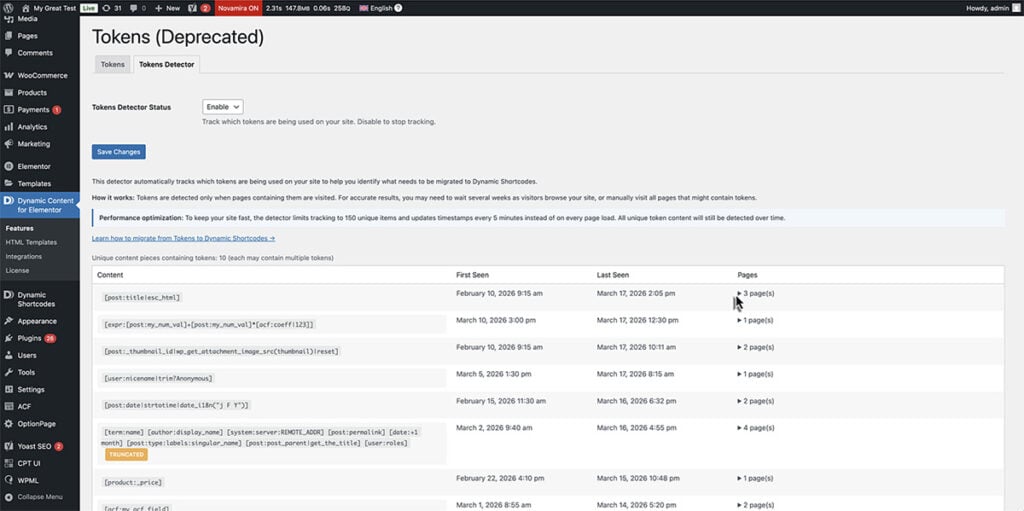
Enable the Tokens Detector, and your site starts building a migration checklist on its own. Every time a visitor loads a page that contains legacy tokens, the detector quietly records it: what token was found, where it appeared, and when it was last triggered.
No crawling. No spreadsheets. Just normal visitor traffic doing the discovery for you.
After a few weeks, you have a complete inventory of every active token across your entire site. Without lifting a finger.
Your Migration Dashboard
Head to Dynamic Content for Elementor > Tokens > Tokens Detector tab, and you’ll find a clean table with four columns:
- Content: the actual text containing the token, so you can immediately recognize it.
- First Seen / Last Seen: when the detector first spotted it and when it last appeared. A token not seen in months? Probably a low-priority archive page.
- Pages: every page, post, or template where that token lives, with direct edit links. Click, find the token, replace it with the Dynamic Shortcodes equivalent. Done.
Five Steps to a Clean Migration
- Enable the Detector in the Tokens Detector tab.
- Let traffic flow, or speed things up by visiting your key pages yourself. The detector only captures tokens when a page is actually loaded.
- Review the table periodically. The Pages column tells you exactly where to go.
- Replace each token with its Dynamic Shortcodes equivalent. Follow the migration guide for the syntax mapping.
- Hit “Clear All” and repeat. When the table stays empty after a couple of weeks of traffic, your migration is complete.
Built for Real Sites
The detector runs silently in the background without affecting your site’s performance. It caps tracking at 150 unique entries, updates intelligently to avoid unnecessary database activity, and handles high-traffic sites gracefully. Enable it, forget about it, check back when you’re ready to migrate.
Why Migrate Now?
Tokens still work, and they will continue to work for backward compatibility. But Dynamic Shortcodes are where all new features and improvements go. They support nesting, offer more flexibility, and integrate with the latest Dynamic Content capabilities. The Tokens Detector removes the guesswork from migration, turning a daunting audit into a simple checklist.
Enable it today. Let your visitors build the map. Then migrate with confidence, one page at a time.