
You’ve built complex Elementor layouts with nested containers, loops, and dynamic visibility rules. But when something breaks—or worse, slows down—you’re left clicking through the backend, guessing which widget is the culprit.
If you’ve used Dynamic Content for Elementor, you might recognize this workflow. Our Frontend Navigator has helped thousands of developers debug their layouts directly from the frontend. Now, we’re taking that core experience and releasing it as a standalone, free plugin on WordPress.org.
Dynamic Inspector for Elementor puts the answer right on your frontend. One click from the admin bar, and you see exactly what’s happening under the hood—no paid license required.

Three Reasons You’ll Never Debug Blind Again
1. Element Tree: See the Full Hierarchy at a Glance
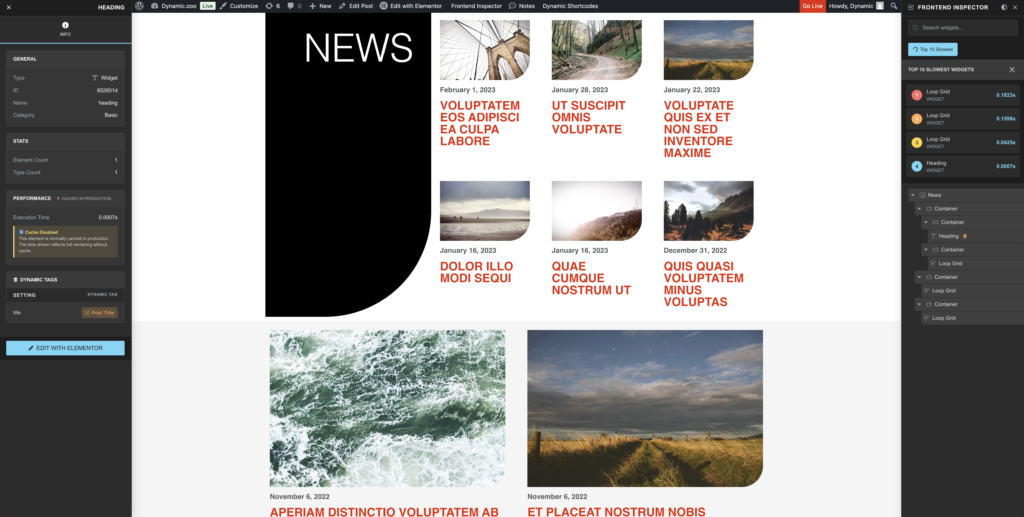
Navigate your entire page structure—containers, sections, widgets, even Theme Builder templates—in a clean dual-panel interface. Hover on any node, and the corresponding element highlights directly on the page. No more scrolling through the backend wondering where that inner container lives.
2. Performance Profiling: Find Your Slowest Widget in Seconds
Every element displays its execution time in milliseconds. The inspector automatically lists your Top 10 slowest elements, so you know immediately if that ACF Repeater or that custom query is dragging down your page load. Crucially, the inspector disables Elementor’s cache during inspection—meaning you see real render times, not cached shortcuts.
3. Dynamic Visibility Conditions: Inspect the Invisible
When you hide elements with Dynamic Visibility, they vanish from view—but not from the inspector. See exactly which conditions are applied, the operator logic (AND/OR), and the trigger events. This means debugging conditional layouts no longer requires toggling rules on and off just to remember what you set.

How It Works
Add ?frontend-inspector to any page URL (or click Frontend Inspector in the admin bar), and a floating panel appears. The left side shows your element tree. Click any element, and the right panel reveals performance data, cache status, and visibility rules.
The inspector is administrator-only and adds a noindex tag automatically—so your debug sessions stay private.
Built for the Pro Workflow
Dynamic Inspector integrates seamlessly with Dynamic Content for Elementor. If you’re using our visibility features, the inspector pulls in your conditions via hook, displaying them alongside element metadata. It also detects Theme Builder contexts, so you can inspect Single templates, Archive layouts, and header/footer structures with full awareness of their document type.
Get Started
Search for “Dynamic Inspector for Elementor” in Plugins → Add New, or download it directly from WordPress.org. It works with Elementor Free and Pro.
Stop guessing. Start inspecting.